Persistent user home
Eclipse Che preserves the /home/user directory across workspace restarts for each non-ephemeral workspace, so that user-specific configurations, shell history, and tooling settings persist between sessions.
This feature is enabled by default. To disable it, patch the CheCluster custom resource:
kubectl patch checluster eclipse-che \
  --namespace eclipse-che \
  --type merge \
  --patch '{"spec":{"devEnvironments":{"persistUserHome":{"enabled":false}}}}'
For newly started workspaces, this feature creates a persistent volume claim (PVC) mounted to the /home/user path of the tools container.
In this documentation, "tools container" refers to the first container in the devfile.
This is the container that includes the project source code by default.
When the PVC is mounted for the first time, the persistent volume’s contents are empty and therefore must be populated with the /home/user directory content.
By default, the persistUserHome feature creates an init container for each new workspace pod named init-persistent-home.
This init container is created with the tools container image.
It runs a stow command to create symbolic links in the persistent volume, populating the /home/user directory.
|
For files that cannot be symbolically linked to the |
The primary function of the stow command is to run:
stow -t /home/user/ -d /home/tooling/ --no-foldingThis command creates symbolic links in /home/user for files and directories located in /home/tooling. This populates the persistent volume with symbolic links to the content in /home/tooling. As a result, the persistUserHome feature expects the tooling image to have its /home/user/ content within /home/tooling.
For example, if the tools container image contains .config and .config-folder/another-file in the /home/tooling directory, stow creates symbolic links as follows:
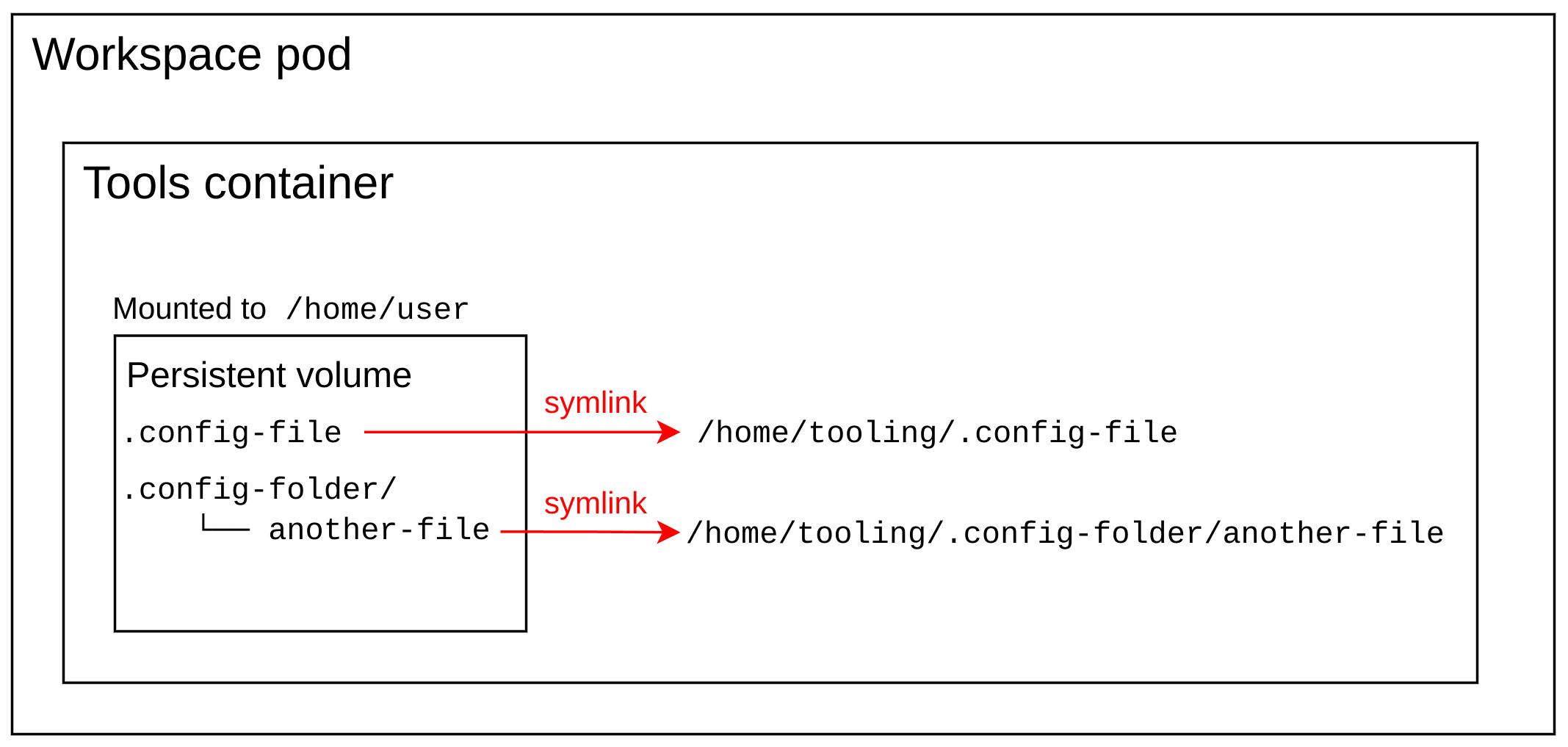
persistUserHome enabledThe init container writes the output of the stow command to /home/user/.stow.log and only runs stow the first time the persistent volume is mounted to the workspace.
Using the stow command to populate /home/user content in the persistent volume provides two main advantages:
-
Creating symbolic links is faster and consumes less storage than creating copies of the
/home/userdirectory content in the persistent volume. The persistent volume contains symbolic links, not the actual files. -
If the tools image is updated with newer versions of existing binaries, configs, and files, the init container does not need to rerun
stow. The existing symbolic links already point to the newer versions in/home/tooling.
|
If the tooling image is updated with additional binaries or files, they are not symbolically linked to the To rerun |
persistUserHome tools image requirements
The persistUserHome depends on the tools image used for the workspace. By default Che uses the Universal Developer Image (UDI) for sample workspaces, which supports persistUserHome out of the box.
If you are using a custom image, the tools image must meet three requirements to support the persistUserHome feature.
-
The tools image must contain
stowversion >= 2.4.0. -
The
$HOMEenvironment variable is set to/home/user. -
In the tools image, the directory that is intended to contain the
/home/usercontent is/home/tooling.
Because the /home/user content must reside in /home/tooling, the default UDI image for example adds the /home/user content to /home/tooling instead, and runs:
RUN stow -t /home/user/ -d /home/tooling/ --no-foldingin the Dockerfile so that files in /home/tooling are accessible from /home/user even when not using the persistUserHome feature.